

Introduction to Local SEO Heat Maps
What is a Local SEO Heat Map?
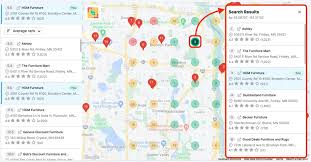
A Local SEO heat map is a tool that shows how well your business is found in Google searches in different areas around your location. Imagine a map with colours (green, yellow, and red) that tells you if people can easily find your business nearby. If you see green on the heatmap, it means you rank high in that area, and people are likely to see your business when they search. Red means you’re not ranking well, so people might not find you as easily.
Heat maps help businesses understand where they’re doing well in local searches and where they need to improve using rank-tracking tools to attract more customers nearby.
Why Are Local SEO Heat Maps Important?
Local SEO heat maps give you a clear view of your business’s local visibility in different areas. They can help you with local profile management:
- See where you’re visible on your Google Business Profile optimization: Find out where you’re easy to find in the local map pack and where you aren’t.
- Target your local SEO campaigns effectively: Focus on areas where you want more customers by improving your visibility there.
- Stay ahead of competitors with a solid local SEO strategy to optimize local visibility. Understand where your competitors rank in the local grid and plan strategies to compete with them.
How Do Local SEO Heat Maps Work?
Local SEO heat maps use data from searches to show you how your business ranks across various parts of a geogrid, helping in your local SEO performance. The colour codes usually mean local SEO performance levels in your SEO report, helping you check your rankings effectively.
- Green areas on the local SEO heat map indicate strong local SEO performance and visibility. Great visibility on Google Maps means people can easily find you and improve your local citations, which enhances your share of local traffic.
- Yellow indicates areas where your business profile is ranking lower. Okay visibility, but room for optimization in your local SEO results.
- Red: Low visibility, meaning local SEO clients likely don’t see your business when they search.
These colour codes on the heatmaps help you easily see the “strong” and “weak” areas in your local area.
Benefits of Using a Local SEO Heat Map
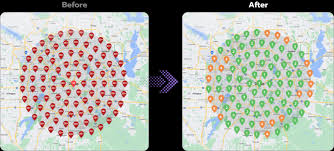
- Identify High and Performing Areas: See exactly where people can find your business in search results and where you might need to improve your local SEO results with a checker.
- Understand Customer Behavior through local SEO reporting: Find out where potential customers are located and how they search for businesses like yours using heatmaps.
- Competitive Edge in Local SEO Services: Know where your competitors rank and adjust your strategy to attract customers in those spots.
How to Create a Local SEO Heat Map
You can create a local SEO heatmap using free local tools like Local Falcon or BrightLocal to visualize your local rank. These tools make it easy to set up your map and understand your search rankings.
Here’s a simple setup process for your GMB heat map:
- Enter Your Business Information: Type in your business name, location, and local keywords that people might use to search for you (like “pizza near me”) to optimize your GBP and generate heatmap reports.
- Choose Your Tool for local SEO services optimization and use local strategies effectively to rank at the top: Pick an SEO tool like Local Falcon or BrightLocal for effective local SEO management service.
- Run the Report: The tool will scan the area you chose and show you a heatmap tool with colours indicating your visibility.
Using Your Heat Map to Improve Local SEO
Once you have your heatmap, you can use it to improve your local search visibility and optimize your local rank tracking. Here’s how to conduct a rank audit for your Google Business Profile optimization:
- Focus on Ranking Areas (Red Zones) to improve your local search results using a dashboard and optimize local visibility: In areas where your ranking is low, you can try to create more content or ads focused on those neighbourhoods as part of your local SEO efforts.
- Optimize Your Google My Business Profile for better local visibility and consider white-label Google Business Profile management options: Make sure all the details in your Google Business Profile (GBP) are correct, like your address, hours, and phone number, as part of your Google Business Profile management services. This local optimization can improve your ranking positions in your local area.
- Create Localized Content for Your Local Area: Write blog posts or updates that mention specific neighbourhoods. For example, a coffee shop could write, “Best Coffee in [Neighborhood].”
- Ensure NAP Consistency (Name, Address, Phone) for your Google Business Profile rankings to enhance local SEO reporting: Make sure your business’s name, address, and phone number are consistent across all local listings online to support your Google Business Profile optimization. This helps Google trust your information, which can improve your ranking.
Advanced Tips for Heat Map Users
- Use Competitor Data for an Advantage: If you know where your competitors rank well in local search results, you can try to improve your own presence in those areas to attract more customers.
- Combine with Keyword Research for your local area to simplify your local SEO efforts: Choose local keywords that people are actually searching for in your area to enhance your SEO ranking. For example, if people in your area search “nearby coffee shop,” include this in your content and Google My Business profile for better local SEO performance.
Frequently Asked Questions (FAQs)
It’s a good idea to audit your Local SEO heatmap every 3-6 months to see if your SEO efforts are working and to check for any changes.
Yes, some report tools let you see where competitors rank. This can help you plan ways to improve your ranking in those areas
Popular tools include Local Falcon, BrightLocal, and local rank trackers. Both are user-friendly SEO tools and provide helpful data for your local SEO strategy to rank at the to
Conclusion: Should You Use a Local SEO Heat Map?
Local SEO heat maps can make a big difference for your business and enhance your local SEO strategy. They show you where people are most likely to find your business location online, allowing you to improve in areas where you’re less visible. If your business depends on local customers, a local SEO heat map is a helpful tool to boost your online presence and attract more customers through free heatmap audits every month.
This guide keeps the explanations simple and easy to understand, helping even a beginner grasp the basics of Local SEO heat maps and their importance in improving local search visibility.