


What is an SEO Audit and Why It Matters
An seo audit checklist is like a check-up for your website. It helps you find out if your website is healthy and working well for search engines like Google, serving as a test tool for your SEO efforts. Regular SEO audits are important because they help keep your site visible, fast, and easy for users to navigate. Plus, you’ll know exactly what to fix to improve your rankings using a tool like Moz Pro!
Types of SEO Audits
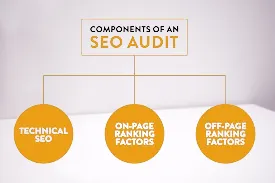
There are several types of SEO audits you can do, including a comprehensive website audit.
- Technical SEO Audit: Focuses on website performance and structure.
- On-Page SEO Audit: Checks for keyword usage, tags, and overall content quality.
- Off-Page SEO Audit: A crucial part of your SEO audit that evaluates external factors affecting your site’s performance. This SEO website audit tool looks at backlinks and your website’s reputation online, providing a comprehensive audit of your site’s SEO.
- Use a site audit tool to conduct a comprehensive content audit.: Examines if your content is relevant, useful, and up-to-date as part of your SEO audit.
Essential Tools for Conducting an SEO Audit
To get started, you’ll need some SEO software to use a tool that makes the audit process easier. Some audit tools are free, and some are paid, but they all help you spot issues on your website.
Free and Paid SEO Tools
- Google Search Console (Free): Checks for indexing issues and shows you how your site is performing.
- Ahrefs is a powerful SEO audit tool that can help analyze your website’s performance. (Paid): Great for checking backlinks and keyword rankings.
- Screaming Frog (Free for up to 500 URLs): Crawls your site and finds technical issues.
- PageSpeed Insights (Free): Check your site speed and give improvement tips.
Step 1: Technical SEO Audit
A technical SEO audit ensures that search engines can easily find and index (or store) all the important pages on your site. Here’s how to get started with easy steps for your site audit.
How to Run a Site Crawl

Using tools like Screaming Frog, run a crawl to see how search engines view your site. The crawl report will show you issues like broken links or pages that can’t be accessed.
Indexing and Crawlability
Make sure that only one version of your site is indexed in the search engine results page. The SEO audit tool is available for analyzing your website’s performance. Having multiple versions confuses search engines and may hurt your rankings, which is why a site audit tool is crucial.
Fixing Duplicate Content and Canonical Issues
If you have similar content on multiple pages, tell search engines which page to prioritize using canonical tags. This way, only the most important page gets ranked.
Improving Site Speed and Core Web Vitals
A fast-loading website keeps users happy and improves page load times, which is essential for good SEO. Use PageSpeed Insights to check your speed and find ways to make it faster. Improving speed also helps you rank better on Google.
Step 2: On-Page SEO Audit checklist
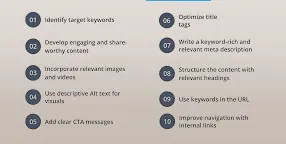
On-page SEO focuses on optimizing content and tags for every page on your site.
Optimizing Meta Tags, Headers, and URLs
- Meta Tags: Include keywords in your title and description to make your content easy for search engines to understand.
- Headers: Use headers (H1, H2, H3) to structure content and make it easy to read.
- URLs: Short, descriptive URLs help search engines and users understand the page topic.
Keyword Analysis and Content Relevance
Check if your content has the right keywords. Ensure you’re using free keywords that people might search for to find your page. Also, make sure the content answers their questions.
Image Optimization
Large images can slow down your site. Compress images to make them smaller and add alt text to describe each image, helping search engines understand them.
Step 3: Content Quality and Relevance Audit
High-quality content is important to keep users interested and engaged.
How to Conduct a Content Gap Analysis
Look at what your competitors are writing about. Are there any topics you haven’t covered? Adding these topics can fill gaps and keep your content fresh.
Refreshing Outdated Content
If your articles are a few years old, update them with new information. This shows search engines that your site is active and relevant.
Matching User Intent
People search for different reasons: some want to learn, others want to buy. Make sure each page on your site answers the needs of its visitors.
Step 4: Off-Page SEO and Link Analysis
Off-page SEO refers to things outside your website, like backlinks (links from other sites) that can enhance your SEO best practices.
Analyzing Your Backlink Profile
Use Ahrefs or Google Search Console to see who’s linking to you. Remove any “spammy” or low-quality links that could hurt your rankings.
Identifying Link-Building Opportunities
Backlinks from trusted sites can improve your credibility. Look for ways to get backlinks, like guest posting or collaborating with other websites.
Internal Linking Strategy
Internal links are links between your pages that can improve your website audit and SEO performance. They help users find more information and spread “link juice” to help important pages rank better.
Step 5: User Experience (UX) Audit
Good UX design makes your site easy to use and encourages people to stay longer, which can positively impact your SEO best practices and search results.
Enhancing Site Architecture
A clear layout helps users find what they need and improves the overall page speed of your site. Group similar content together and make navigation easy across sections of your site.
Creating a Mobile-Friendly Experience
Since many users browse on their phones, make sure your site looks good on mobile devices to avoid technical SEO issues.
Using Heatmaps and User Behavior Analysis
Tools like Hotjar can show you where users click and how far they scroll, aiding in performing an SEO audit. This helps you spot areas to improve in your site audit and enhance user experience.
Step 6: Security and Protocols
Security is critical, not only for protecting users but also for building trust.
Importance of HTTPS
An HTTPS site shows users and search engines that your site is secure. Make sure your SSL certificate is up-to-date.
Setting Up Regular Security Audits
Use tools to scan for security threats and set up alerts to catch issues early.
Step 7: Data and Performance Tracking
Once you’ve done your audit, set up tools to monitor your progress.
Setting Up Google Analytics and Search Console
These free tools help you track site visitors, page views, and how people find your site as part of your SEO audit.
Monitoring Key Metrics
Track metrics like bounce rate (how quickly people leave) and conversion rate (how many people complete an action) to identify potential SEO issues.
Adjusting Your SEO Strategy
Use data insights to refine your SEO approach over time.
Unique Value Additions for a Better SEO Audit
To stand out, offer extras like templates, expert tips, or free tools as part of your SEO audit.
Free SEO Audit Template for Download
Provide readers with a template they can download and use, making it easier to follow along.
Expert Tips and Common Mistakes to Avoid
Share tips from SEO experts and mention common SEO issues, helping readers avoid pitfalls during their site audit report in Google Search Console.
Final Checklist for SEO Audit Success
A Quick Checklist to Ensure Comprehensive Coverage
Summarize the key points in a checklist to make it easy for readers to ensure they’ve covered everything.
Best Practices to Keep Your Site Optimized
SEO is ongoing, requiring continuous adjustments based on your audit report. Encourage readers to regularly check and update their website to keep it performing at its best.
FAQs about Seo audit Checklist
What is the purpose of an SEO audit?
An SEO audit helps identify issues that may be affecting your website’s performance on search engines. It covers various aspects like technical setup, content quality, user experience, and link-building, all aimed at improving search visibility and user engagement.
How often should I conduct an SEO audit?
It’s recommended to do a full SEO audit at least once a year. However, for high-traffic websites or sites frequently adding content, a quarterly or even monthly audit may be beneficial.
What’s the difference between a technical SEO audit and an on-page SEO audit?
A technical SEO audit focuses on the website’s technical aspects, such as site speed, mobile-friendliness, and crawlability. An on-page SEO audit examines content-specific elements like keywords, meta tags, headers, and overall content quality on each page.
Do I need paid tools to perform an SEO audit?
Not necessarily. Many free tools, like Google Search Console, PageSpeed Insights, and Screaming Frog (up to 500 URLs), provide valuable insights. However, paid tools like Ahrefs or SEMrush offer additional features that can deepen your audit and analysis.
How can I improve my site’s speed during an SEO audit?
You can use tools like PageSpeed Insights to identify speed issues. Common ways to improve speed include compressing images, enabling browser caching, reducing server response time, and using a Content Delivery Network (CDN
Why is HTTPS important for SEO?
HTTPS ensures your site is secure, which builds trust with users and search engines alike. Google considers HTTPS as a ranking factor, so having it can improve your search rankings.
How does mobile-friendliness affect SEO?
Google uses mobile-first indexing, meaning it predominantly uses the mobile version of content for ranking and indexing. A mobile-friendly site can boost user experience and help with better rankings on search engines
What is link juice, and why does it matter?
Link juice refers to the SEO value passed from one page to another via links. Internal links spread link juice throughout your site, helping important pages rank better by signaling their relevance to search engines.
How can I monitor my SEO performance after an audit?
Using tools like Google Analytics and Google Search Console, you can track key metrics such as organic traffic, bounce rate, and conversion rate to see how well your optimizations are working.